New AT&T Research Reveals Clues to Smarter App Development

This time I’d like to publish a post written by Doug Sillars member of the AT&T Developer Program team, he asked me to publish it on my blog so here we are, great job Doug!
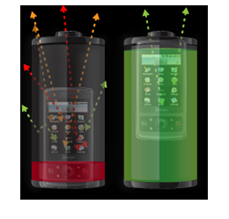
Nothing chases away users (or invites bad reviews!) like an app that is slow or drains battery life too quickly. New research from AT&T and University of Michigan offers insight into how applications can be modified to prevent these issues from occurring. Historically, wireless optimization best practices have focused on how to optimize content for smaller screens and slower processors. In this article, the researchers describe how mobile wireless networks are different than wired networks, and how simple changes to your app can work WITH the network to improve your application’s efficiency.

What is truly fascinating about this study is that developers are given a peek at network architecture and lower-level protocols that are usually hidden from them. The researchers describe in detail the connection latencies and state machines that exist in wireless networks, and how much longer these timeframes are than in traditional networks. The main takeaway for developers is that all connections open and close on the order of seconds (as compared to milliseconds in the wired web). These latencies make content downloads appear slow, and can drain the battery quickly.
The researchers point out that it is more efficient to utilize fewer connections to send more data per connection. For example: 5 connections of 1 KB each utilize 90 seconds of radio, while one 5 KB transfer uses 19 seconds (a 79% decrease in battery usage for the same amount of data!).
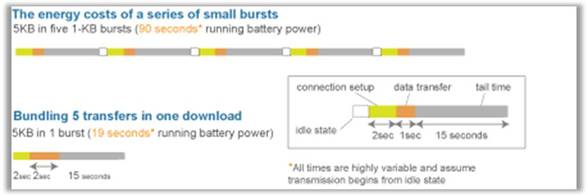
Each network connection causes a power drain to the battery, and can make your application appear slow to the end user. By sending more data per connection (and using fewer total connections), you can drastically improve your application’s performance. The researchers provide the example of a news application that downloads data on demand (e.g., images are downloaded when the user scrolls to them). They found that prefetching images (sending many files in anticipation of future use) can reduce power consumption by 15-18%. Since the images are downloaded in advance, they are available for display immediately, and your application appears faster. However, the researchers are quick to point out that prefetching data is a delicate balance, as downloading content that is never used also wastes the battery (and can cause your users to exceed their monthly data caps).

In the case of a popular music streaming service, periodic audience measurements were draining battery life, causing the app to use more than 40% of its power to transmit just 0.2% of its data. By lengthening the time between these measurements, it is possible to greatly reduce the battery drain, and allow users to listen to more music (and at the same time view more revenue-producing advertisements)!
AT&T has begun working with developers of popular applications (like Pandora and Facebook) to enthusiastic responses. The biggest response has been that the solutions to optimize wireless applications are straightforward and benefit both the developer and the end user!
Flash Camp Milan review

Yesterday in Milan we had the Flash Camp about Mobile topics and then we had the Flash Camp Party at NH Hotel… really wonderful time.
Like you know, in Italy it’s not so easy to organize those kind of events because usually people don’t move to another city like other foreign countries but Flash Camp had a great success.
This camp was organized in the same place of WhyMCA the mobile revolution, an italian conference focused on mobile topics.
We had 50/60 people per session and I’m glad to say that my session had 80 people so I’m happy about this little success.
All the sessions surfed in deep about CG, design patterns, video optimization for mobile, flex on mobile and so on, so I was really excited to take part in this event.
My session was about Design Pattern for Mobile, I talked about 3 design patterns: Singleton, Observer and Presentation Model.
With a couple of samples (that you can download from this link) and few slides I made an application that run with the same base code on tablet and smartphone; this is an hot topic now on mobile world in particular on Flash Platform side.


In next few weeks I’ll make a post about Presentation Model to share my thoughts about this argument and how to use it in your project , but if you want to start with this topic, take a look at this great post on RIArockstars.

Finally I’d like to thanks the Flash Mind, Adobe Flash Platform User Group Italy, to give me this opportunity, WhyMCA staff for the amazing organization, other speakers of Flash Camp for great time spent together and people that came to talk with us during the Flash Camp and to the beer party too.
I leave also a link to some photos took during Flash Camp in Milan.

Playbook development with Flash Platform

First of all a big THANKS to Mihai Corlan, Adobe Evangelist, that is helping me during this “journey”.
Everything start last year during MAX when I saw for the first time the new BlackBerry tablet: the Playbook 😀
It looked so nice, I thought that it was really amazing.
So after few months I decide to try… and now, I finally can announce that with Mihai we are working on a book on Playbook application development with Flash Platform!

It’ll be an hard job but I want to do it, I hope to receive useful suggestions and questions about this topic and believe me that I’ll be free to talk with you about that.
It will be a book made by developers for developers so I hope that you’ll enjoy it when will be released this september (more or less).
This book will cover following topics:

  • Build, port and optimize apps for the BlackBerry PlayBook tablet device
  • Work with the PlayBook OS APIs, ActionScript, Flex, AIR and other Flash tools/APIs for PlayBook
  • Build a simple app and consuming data
  • Create multimedia and gaming apps for the BlackBerry PlayBook
  • Debug and optimize your PlayBook app

For any news about this book and about Flash Platform development follow this blog and my twitter or facebook account.

Adobe CookBooks Reader for Android

Hi everyone,

I’ve just released on Android market the CookBooks Reader application where you can read all new recipes about Flash Platform technologies.
It’s FREE and it’s based on Flex 4 and Adobe AIR so remember to download it before download CookBooks Reader.

If you try it, feel free to leave here comments with new features or suggestions…  I’m looking for you! Let’s go Flash Platform geeks! 😛

mPresenter, flash platform presentation tool

mPresenter is a new tool that my company develop in last few months, finally is available to download.
Going in deep about this new solution, what is it mPresenter?

mPresenter is a cross-platform software composed by 2 different tools: a mobile manager and a desktop viewer.
It helps you during own presentation to your boss or clients, during a public talk or only when you want to show your holidays photos to your friends.
With mPresenter you can manage your presentation directly from your mobile device, you can draw or highlight on a slide, photo or flash file, change with next or previous content, receive comments that you add in content and so on.

You can download AIR version on mPresenter official website and Android controller directly on Android Marketplace.In next few days (I hope) you can find mPresenter mobile on Apple store too, so stay tuned for news about it!

Do you want watch mPresenter in action? Take a look at youtube video.

Do you want to have a free copy?! It’s easy, go to official website, add mPresenter banner to your blog or website and the first 10 people that add a comments to this post with a link at own website with mPresenter banner automatically win a free mPresenter copy!
Remember to leave in the comment your name, email and link to the site where I can find mPresenter banner.

Finally, if you are going to MAX in L.A. and you want to know more about mPresenter, you can find me there, so feel free to drop me a line to meet there.

I’m waiting for feedbacks and have fun guys with mPresenter!

Android development with Flash Platform

First of all I’d like to say thank you to JUG Padova that give me opportunity to talk about Flash Platform in own Java User Group.
Saturday morning I got a talk about Android development with Flash Platform in a school in Padova.
There were 40/50 people more or less, students, Flash Platform devs and Java devs, so I’m glad about the final result.

I talked about my experience on working with Flash Platform on Android, suggested some tips & tricks to improve own applications made with AIR or web site for Flash Player on Android and finally I reported latest news from Flash on the Beach general session.

Adobe has just released Adobe AIR for Android so from last weekend you can download it and start to develop your own Flash Platform contents for Android devices.

You can download my presentation slides with some samples directly here, for now slides are in Italian but if someone is interesting in an English translation feel free to add a comment here.

UPDATE
Here you can watch the seminar: http://www.archive.org/details/AndroidDevelopmentWithFlashPlatform

Flash Platform Geeks: new community is born

And YESSSSSS!

In this hot summer, I’m really glad to announce Flash Platform Geeks, a new Flash Platform community made in collaboration with Peter Elst!
Flash Platform Geeks is dedicated to all flash platform lovers like us!
Soon you can see online our website, our forum and so on, I’m really excited about this new adventure

It will be crazy, totally insane and if you go to Flash on the beach this year, believe  me, when I say that you’ll remain astonished!

So please, start to follow us on Twitter, Facebook and Flickr too!
See you around guys and thank you in advance to spread the word and follow Flash Platform Geeks

Android development with Flash Platform (FREE SEMINAR)

First of all a big thank you to Padova Java User Group that give me an opportunity to speak in the end of September in a JUG meeting.
My speech will cover Android development with Flash Platform, so I share my mobile experience and I’ll talk about those main topics:

  1. UI design for mobile device
  2. Working with Flash Platform to create mobile content
  3. Actionscript 3 overview
  4. tips & tricks on mobile development
  5. testing on device

Seminar will take part in Padova in the end of September, you can take a look at the program directly from JUG event site.
It will be totally FREE but I suggest to register yourself very soon because venue isn’t so big.

For any questions feel free to contact me directly or leave a comment here.

Finally, in November I’ll be speaker at WebTechCon in Milan, I’ll talk about AS3 design patterns and Multiscreen development with Flash Platform so if you want to know more about this event take a look at WebTechCon official site.

Creative Suite SDK

Last few months CS5 was presented and few people talked about a new opportunity that is CS5 SDK that allow flex developers to create native panels for Illustrator, Photoshop, InDesign and so on.

There are great opportunities because you can automatize any kind of process in your daily workflow and create your personal panel made with Flex and Actionscript 3.
If you are familiar with JS opportunities for InDesign or Photoshop, you know the power of those solutions but now you can have an interface that help your daily work.
You can also dialog with other softwares like AIR apps or native apps like a Digital Assets Management or again with other panels made with Flex!
So, believe me, now we have new and amazing opportunities with this new SDK.
The most important thing to start develop for those design softwares is to know how they work and then everything will be so natural.

With my company, we start a new project called Creative Suite Panels where people could download or buy new creative suite panels, ask us to develop one or other developers could sell own panels directly from this site (this last service soon).
We’d like to create a panels store where people can buy, sell or simple download new functionalities for own favorite design software.
In Creative Suite Panels you can also download a Flickr panel made for InDesign CS5 that allow you to search images on Flickr, download them and

For more information take a look at cs5 sdk team blog.

Working with zip files and Flash Platform

In our last Flash / AIR project we are working with tons of automations to create files, save them on computer, download files from the web and so on.

A library that I think could be interesting not only for us but also for other people that will work with zip files is FZIP from codeazur.

I saw it a couple of years ago and finally I used it, I think it’s so cool for your desktop or web projects based on Flex, Flash or AIR.
Working with FZIP is so easy, if you want to add a file into a new zip file you only write:

var zip:FZip = new FZip(); zip.addFile(f.name, f.data); //f is a File object instance

You can also set a particular position for your file with addFileAt method, remove a file, read each file and working with it without using any different language; all with Actionscript 3!

When you are ready to create your zip file you can save it with FileStream object like this:

var ba:ByteArray = new ByteArray(); zip.serialize(ba) ba.position = 0; var finalZIP:File = File.desktopDirectory.resolvePath("AIRZIPPER.zip"); var fs:FileStream = new FileStream(); fs.open(finalZIP, FileMode.WRITE); fs.writeBytes(ba); fs.close();
So easy, isn’t it?!
One of the main thing that could be interesting to know about FZIP is that library doesn’t read zip file with data descriptor like you can read on official website in Limitations paragraph:
FZip generally can’t read ZIPs that make use of Data Descriptors. Examples of such ZIPs are those created by the Mac OS X Archiver utility, SWCs, JARs, etc.
So to solve this problem I made a simple AIR application that zip your files (only files for now but soon I also work with folders and subfolders) and give a perfect zip file without any data descriptor, so you can use to work with FZIP lib.
You can download it for free from this link (I think they are on dedicated servers), I hope that you enjoy it and if you have any requests feel free to ask me via email or adding a comment to this post!
UPDATE
I’ve just received a mail from Claus of codeazur that gives me a new repository for FZIP where they solved data descriptor issue; thank you Claus!